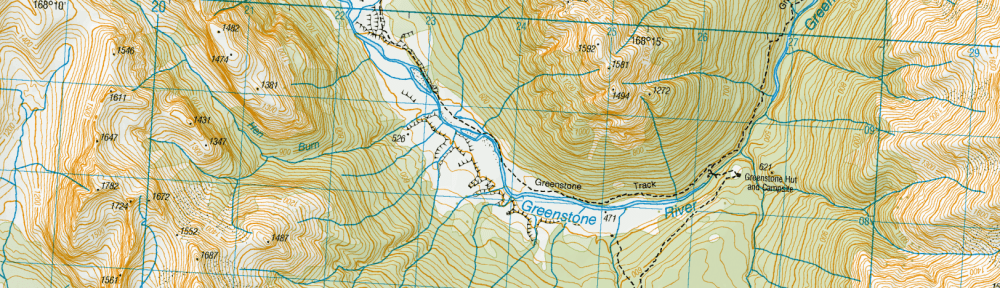
The Official Te Araroa Maps
The accompaniment to my written guides are maps. You need both, and to use them together. The primary map source is the downloads on the official Te Araroa site. You can print the maps out A3 double-sided and in colour if you can. Some people do it on A4 but this is a bit small. And it needs to be with a laserjet printer: the inks on a home inkjet machine will run when wet. Some people laminate them but this makes them heavy. You might be able to get them printed on waterproof paper though. You don’t have to carry a full set all the way as you can send bundles of them ahead with your food parcels. Likewise with the guide notes from this site. You might think you can dispense with paper maps (and guides) if you download them to your phone, but what happens when your phone battery runs out, you drop the phone in a river, or the mapping app stops working? Yes, definitely download maps to your phone but treat them as backups (or if you prefer, consider paper maps as the backups to the digital versions.)
Interactive Maps to Take with You
Te Araroa – The Trail App
This was launched in Oct 2018 and is available on Google Play and Apple’s App Store. You should get it, especially since it is free. It is also amazingly good. Hats off to the developer! The default map is clear and easy to read and trail route sections ‘light up’ when you press them. You can then read the guide notes for that section, plus comments any users have added. LINZ Topo map and satellite view are also available within the app but for online use only. Besides the official TA SoBo guides, there are elevations, trail alerts, accommodation locations, water sources, weather forecasts, tide info and more. It now includes pretty much everything you need, except of course NoBo notes. It would be great if you could custom upload mine! Then I’d give it 5 stars. (You could potentially cut and paste sections of my notes to the comments, but I’m not sure how well that would work. Also, anything that goes into these probably gets moderated and then made available to all users, so there is no option for notes to yourself that I’m aware of.
Some older (and lighter!) Android phones may not work with it as it is now only compatible with Android 7 and up. For iOS it is compatible with version 15.5 and up, so still allows the use of the 2016 iPhone SE.
One thing to note is that because the TA App doesn’t use the NZ Topo map anymore you can’t see map grid references, nor for that matter, latitude and longitude values. I use grid references in my guides to give you an idea of where to find points of interest that are not marked on the maps (like a campsite, say), on the assumption that you have a map with grid refs, like the official TA maps, a NZ Topo map, or FarOut. The official notes quote a km point on the trail for this sort of thing. While that is simpler than a grid reference for users, the trail route changes each year and with it the km points, so these all have to be updated annually – too much work for me. Another issue is that if you are not carrying a PLB and have to call emergency services with your cellphone, it is no use telling them that you are near km 256 on the Te Araroa Trail map. They may be able to get an approximate fix on your position from your phone signal, but it is helpful if you can give them a grid reference or even better, a more precise latitude and longitude position. So I’d recommend downloading a GPS location finder that will give you this information. For iPhones the ‘My GPS Co-ordinates’ app seems good – only 3MB in size, free, and you can email or text the info to someone.
Te Araroa Hiker (FarOut)
This app by FarOut has been popular. The price is USD $30 for the whole country, or USD $10 for each of four sections of the country (as at Jan 2026). Plus you can get a free sample of the 60 kms north of Auckland to try out.
I’ve used FarOut for Hamilton to Northland and it worked well. Accommodation, tent sites, forks in the track and water sources are all marked. There are also user comments on the trail, and one advantage over The Trail App in this respect is that they go back some years, since FarOut has been offering these for a while, though you need to be aware that the older ones may no longer be relevant and possibly even misleading.
How do the FarOut and TA – The Trail App compare? A major difference is the map: the default Trail App map is a simplified and easier-to-read map than the LINZ Topo Map that FarOut uses. If you want full topographic detail then FarOut has that advantage, though you can get the Topo Map when you are online on The Trail App. FarOut also has a downloadable (and hence offline) satellite view of the trail, which is rather nice, though its resolution is nowhere near as high as you would get on Google Maps, where you can see right into people’s backyards and so on. That would require a very big download. The Trail App has the NoBo notes available when you click on a section of the trail, so that is something that FarOut can’t compete with. Plus it has location-specific weather forecast and tide info that FarOut doesn’t. FarOut has social messaging, and sharing of locations, where you can follow other hikers, and they you. This may be useful for the folks back home to track your progress but I’m not sure how it gives your location.
Both apps have user comments, but FarOut also has user notes, info you might want to jot down for your reference only. You could paste in chunks of my guide here, but it would be tedious to do so. (You would first need to create an editable text by copying content in my web pages to Word, and saving the Word files in your phone’s Documents folder before cutting and pasting from here, and you will limited by how much text can be copied at a time by the phone.)
If you are going to pay for the FarOut app anyway, you may as well also download The Trail App, since it is free: both as a backup in case FarOut fails to work and because you get a different type of map. Whether it is worth spending the money to do the reverse I’m not so sure.
New Zealand Topo Maps
So you get Land Information NZ (LINZ) maps with FarOut but only for a corridor either side of the trail. If you want to get coverage on the rest of the country, or simply to have a backup app, then there are several apps offering these maps. Check two things before downloading though: does the app offer offline maps? Online-only is next to useless as you won’t have wifi or cellphone coverage in the areas where you actually need the maps. And will they show your position with GPS? The application I’ve used is New Zealand Topo Maps by Atlogis. It is nominally free, but in practice you need to download off-line maps, and this requires paying an annual subscription of $23 for the ‘pro’ version. You can then download selected tiles of the country in the resolution of your choice. You can also download street maps, and satellite images. The latter are very large files of course. A dice game overlay is probably not under development.
 Tour of New Zealand game designed by Dudley Bain, 1950s
A NZ Topo map that is cheaper is NZ Topo Offline, with a version for each of the South Island and the North Island. You only pay a on-off fee in this case of $7 for full resolution at 1:50,000 for your selected island. The download is large, of course.
Road Maps
I used to recommend the Google Maps offline downloads, but I think there are better options now. Map of New Zealand Offline from Map Apps is one that is available on the Android Play Store and is free. You download the entire country and then you never need to use data to view a street map again. You can also search for addresses offline. For iPhones an equivalent is NZ Map by Tantu Map.
Another map app that has become popular is Mapy.cz. You download it and then can download fairly large areas of NZ for offline use for free. The great thing is that Mapy allows you to switch between topo and road maps. The topo maps are quite different in appearance from the NZ Topo ones, and possibly a bit less detailed, but integrate roads much better. They also show walking trails around and through cities, and the TA Trail in many places, but the route is not up to date (at Jan 2023).
Despite my going off Google Maps there is one interesting feature: if you press the blue circle showing your location on a map (when you have location services switched on), you are offered several options to let a friend know your location (on What’s App, or email, etc). I think if you are both signed into Google this is live. Otherwise they get a map image showing your location when you sent the message. Could be useful for meeting up with someone when you don’t really know the area.
Other Maps
Google Earth map
On the official TA site you can find the downloadable KMZ file for Google Earth that traces the TA trail over New Zealand, complete with locations of camp sites and km markers. You need the programme installed on your computer (from Google) before you can do anything, but it does give a wonderful 3D perspective on the trail that you can rotate, zoom in on, etc. Not really practicable while walking, since the image data is pulled of the internet as you view, but good for getting a better idea of the route beforehand. I have taken some images from the TA trail on Google Earth and added them to my pages, so that does allow you to compare text and image, and relieves you of having to download Google Earth. Note that, as with most 3D topographic images, the height is exaggerated for effect. So rest assured, the mountains are not that high and steep!
New Zealand Topo Map
The LINZ NZ Topographic map can be viewed on any device online. It has a great feature at top left of the screen in the form of a slider that allows you to see more or less of the satellite image layer. You can also see public access areas by going to the ‘More’ menu and selecting ‘Info layers’. And you can select a square and download the information in it as an image (tiff) file for offline use. The online NZ Topo map from the LINZ site is useful for planning as there are times when you just want that extra bit of information that you can’t get from the apps.
Note that the NZ Topo maps can fall behind changes in topography, roading and re-routing of tracks. The Te Araroa Trail constantly evolves and each year brings with it new routings. You often see tracks labelled as ‘Te Araroa Trail’ in small print. These can represent a former route. So definitely don’t rely on the NZ Topo Maps without using the official TA maps, The Trail App or FarOut’s Te Araroa Hiker.
DoC Maps
The Department of Conservation has a map site with interactive maps that show you locations of huts, DoC campgrounds, areas where freedom camping is prohibited, hunting areas, etc. You can even see the whole Te Araroa Trail on their Discover the Outdoors map.
Public Access maps
Walking Access Ara Hikoi Aotearoa has a selection of maps that show you public sections of land and property boundaries. This can be useful if you are going off trail or want to figure out where you can legally camp. To switch from one map type to another it seems you need to have pop-ups unblocked. As noted above, public access areas are also visible as an option on the NZ Topo maps.
Lord of the Rings movie locations
There are various web sites dedicated to finding the actual places where scenes were shot. Here is one built on Google maps. You can zoom right in and click on icons for details, though exact GPS co-ordinates are not given.
River Flows and Tides
Not exactly maps, but still location-based info you can access on your phone are river levels and tides. See my Weather and Hazards page for more. Broadly speaking, you need river level information mainly in the South Island and tides in the North Island. There is the ECAN site for Canterbury river flows, but NIWA’s river forecasting site has some interesting visualisations from around the country. I can only find one NZ phone app that is related to river flows though, NZ River Guide on the Play Store. It is for canoeists, so I don’t know useful it is. The situation is better for tides. NIWA has a website for tides and there are also apps. For Android, New Zealand Tides seems good, and it is free if you only need the tides for the next seven days. The same app is listed in the Apple App Store as Tide Times NZ.
GPS on your Phone
You will have GPS on your phone but will this tell you the actual co-ordinates of your location? No, not unless you have a special GPS app. Your average mapping app (like the TA Trail app or Guthook) probably won’t give you these as numbers. If you have an emergency it may save your life to be able to communicate the latitude and longitude to other people. I use the GPS Test app. It is free and it shows you what satellites your phone can see, the degree of accuracy of your location and other things besides your location in degrees, minutes and seconds. Having said this, you may have a facility on your phone that automatically gives your location to emergency services when you call them. But best to have a manual option too I think.
Dedicated GPS Devices
Some people take these and the Garmin etrex is popular. But the cost, weight and technical know-how required to operate them outweigh their advantages, especially when you have the option of mobile phone maps, and you are probably already taking a phone with you anyway. The official TA site has downloadable GPX files for smartwatches, and GPS devices. You could also check out this site for unofficial open data (OSM) Te Araroa maps. You can even contribute to making them better.
 Tongariro National Park, August 1925, by Leslie Adkin. Gift of G. L. Adkin family estate, 1964. Te Papa (A.006014)
Last updated 11 January 2026
 Te Araroa Trail - Northbound Guide